
How to Get End Portal Blocks in Minecraft
The End Portal is one of the most important structures in Minecraft because it allows you to travel from the Overworld to the End, the dimension where you can fight the Ender Dragon. However, there is an important difference between an End Portal and the End Portal Frame blocks used to create one.
In normal Survival gameplay, you can find End Portal Frames inside Strongholds, but you cannot break and collect them with a pickaxe or any other normal tool. If your goal is to obtain the actual End Portal Frame block as an item, you generally need to use commands or Creative-mode techniques. The method can also vary depending on your Minecraft Edition and version.
This guide explains how End Portal Frames work and how a very new player can obtain and use them with commands.
How to Get End Portal Blocks in Minecraft
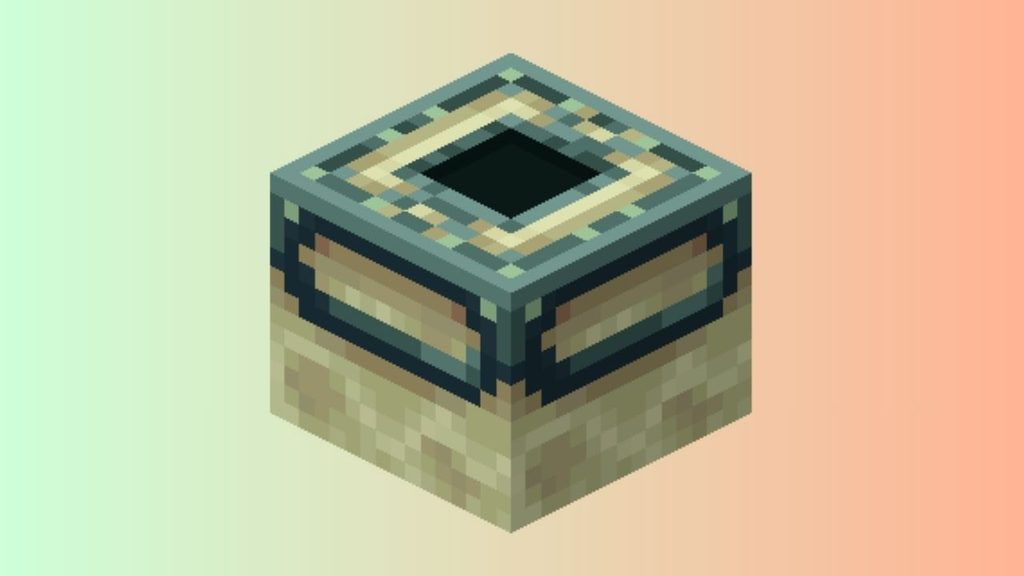
You cannot normally obtain End Portal Frame blocks in Minecraft Survival mode because they cannot be mined or picked up as items. To get End Portal Frames, enable Creative mode or commands, then use the appropriate /give command. In versions where the command is supported, enter /give @s end_portal_frame in the chat. You can then place the frames in Creative mode and activate the portal using Eyes of Ender.
Let’s explore the steps in detail!
Step 1: Understand What End Portal Blocks Are
Before trying to obtain an End Portal block, it is important to understand what you are looking for. Minecraft has several blocks and entities associated with an End Portal, and they are not all the same thing.
The End Portal Frame is the greenish block that forms the border of an End Portal. You need 12 End Portal Frame blocks to create the complete frame. Each frame has a socket on top where you can place an Eye of Ender.
The actual black, starry-looking surface that appears when the portal is activated is called an End Portal. This is different from the frame itself. You cannot simply collect the portal surface as a normal block.
If you are searching for the block that lets you build your own End Portal structure, you want the End Portal Frame.
Step 2: Know Why You Cannot Mine End Portal Frames Normally
If you have already found a Stronghold and tried to break an End Portal Frame, you may have noticed that nothing happens.
This is intentional. End Portal Frames cannot be obtained through normal mining in Survival mode. Even if you use a powerful pickaxe, the frame will not drop as an item.
This means you should not waste time trying different tools or enchantments to collect one. The normal Survival route is to find a Stronghold and use the existing End Portal rather than removing its frames.
If you specifically want End Portal Frames in your inventory, you need to use a method such as Creative mode or commands.
Step 3: Create or Open a World Where Commands Are Allowed
The easiest method for a beginner is to use a world where you can run commands.
If you are creating a new single-player world, look for the option that allows Cheats or commands, depending on your Minecraft Edition and version. Turn this option on before entering the world.
If you are already playing a Java Edition world and cheats were not enabled when you created it, you can temporarily enable commands by opening the game menu and selecting Open to LAN. You can then enable the option to allow cheats and start the LAN world.
Keep in mind that enabling cheats can affect certain gameplay features and achievements, depending on your Edition and circumstances.
Step 4: Open the Minecraft Chat
Once commands are available, open the Minecraft chat window.
On a typical PC setup, you can press the T key to open chat. You should see a text field where you can enter a command.
Commands begin with a forward slash (/). Make sure you type the command correctly because Minecraft will use the text you enter to determine what you want it to do.
For a beginner, it is easiest to copy the command carefully rather than trying to remember every part of it.
Step 5: Use the Give Command to Get an End Portal Frame
Now enter the following command:
/give @s end_portal_frame
Press Enter after typing the command.
The give portion tells Minecraft that you want to receive an item. The @s target selector refers to the player running the command. The final part, end_portal_frame, identifies the item you want.
If the command is accepted by your version of Minecraft, the End Portal Frame should be added to your inventory.
If you want to build a complete portal, you need 12 frames. Depending on the version and command syntax available to you, you may be able to specify a quantity after the item name. For example:
/give @s end_portal_frame 12
If that particular syntax does not work in your version, use the command suggestions that appear while typing the command in chat. Minecraft’s command autocomplete can help you identify the correct syntax for your version.
Step 6: Switch to Creative Mode if Necessary
If you are using commands, you can also switch to Creative mode to make placing the frames easier.
Enter:
/gamemode creative
Then press Enter.
Creative mode gives you access to blocks and items without requiring you to gather them through normal Survival gameplay. It also makes it much easier to experiment with an End Portal because you do not have to worry about mining materials or taking damage while building.
You can switch back later with:
/gamemode survival
The exact command behavior can depend on your Minecraft version and world permissions.
Step 7: Place the 12 End Portal Frames Correctly
Getting the blocks is only half of the process. If you want to build an End Portal, you must place the 12 End Portal Frames in the correct arrangement.
The structure is a square-shaped ring with three frames on each side. The middle of the structure should remain empty.
There is also an important detail that often causes problems for beginners: the direction of the End Portal Frames matters.
The frame blocks need to face toward the center of the portal. If you place them incorrectly, the portal may not activate even if all 12 blocks are present.
One of the easiest ways to build the structure correctly is to stand in the center area and place the frames around yourself while keeping their openings directed toward the middle.
Step 8: Get 12 Eyes of Ender
After placing the frame, you need an Eye of Ender to activate it.
You need one Eye of Ender for each frame, so a complete portal requires 12 Eyes of Ender.
Eyes of Ender are also important in normal Survival gameplay because they can help you locate Strongholds. You can obtain them by combining an Ender Pearl with Blaze Powder.
If you are using Creative mode, you can simply access the Eye of Ender from your Creative inventory.
Step 9: Place an Eye of Ender in Each Frame
Approach each End Portal Frame and interact with it while holding an Eye of Ender.
Place one Eye into every frame.
Continue until all 12 frames contain Eyes of Ender.
If the frames are positioned correctly and all 12 Eyes have been inserted, the center should transform into the active End Portal.
You should see the familiar dark, animated portal surface appear in the middle.
Step 10: Enter the End Portal
Once the portal is active, step into the center.
After a short moment, Minecraft will transport you to the End dimension.
If you are playing Survival mode, make sure you are prepared before entering. The End contains the Ender Dragon, Endermen, and other dangers. You should ideally have suitable armor, weapons, food, blocks, and other useful equipment.
If you are simply testing how End Portals work, Creative mode is much safer because you can experiment without worrying about losing your equipment.
Faqs
Can You Get End Portal Frames in Survival Mode?
Not through normal gameplay. End Portal Frames cannot normally be mined and collected as items in Survival mode. You need to use commands or another method that grants access to the block.
Can You Break an End Portal Frame With a Diamond Pickaxe?
No. A Diamond Pickaxe cannot make an End Portal Frame drop as an item. The same applies to stronger tools and normal enchantments.
How Many End Portal Frames Do You Need?
A complete End Portal requires 12 End Portal Frames. You also need 12 Eyes of Ender to activate all of the frames.
Can You Get End Portal Frames in Creative Mode?
Yes. Creative mode is one of the easiest ways to access End Portal Frames. You can obtain the frame through the Creative inventory or, where commands are available, use the appropriate /give command.
What Is the Command for an End Portal Frame?
On versions that support this item identifier and command syntax, you can use:
/give @s end_portal_frame
You can also specify a quantity where supported, such as:
/give @s end_portal_frame 12
Minecraft’s command autocomplete can help if your particular version uses different command syntax.
Why Is My End Portal Not Activating?
The most common reason is that the End Portal Frames are facing the wrong direction. All 12 frames must form the correct ring and face toward the center. You also need to place an Eye of Ender in every frame.
Can You Get the Actual End Portal as a Block?
No. The active End Portal is not obtained like an ordinary inventory block. The portal is created when the correct End Portal Frame structure is activated.
Is the End Portal Frame the Same as the End Portal?
No. The End Portal Frame is the block forming the border. The End Portal is the active portal surface that appears inside the completed frame.
Summary
Getting End Portal Frames is different from finding an End Portal in Survival mode. You can find End Portal Frames naturally inside Strongholds, but you cannot normally mine them and collect them as items.
For a beginner who wants to build an End Portal somewhere else, the simplest approach is to enable commands or Creative mode, use /give @s end_portal_frame to obtain the frames, and place 12 frames in the correct arrangement. You then need 12 Eyes of Ender, with one Eye placed into each frame.
The most important thing to remember is that End Portal Frames must face the correct direction. If even one frame is positioned incorrectly, the portal may not activate.
Once all 12 frames are correctly placed and filled with Eyes of Ender, the portal will open and allow you to travel to the End.